Docs / Human-in-the-Loop
All Tasks in One Dynamic, Smart Table
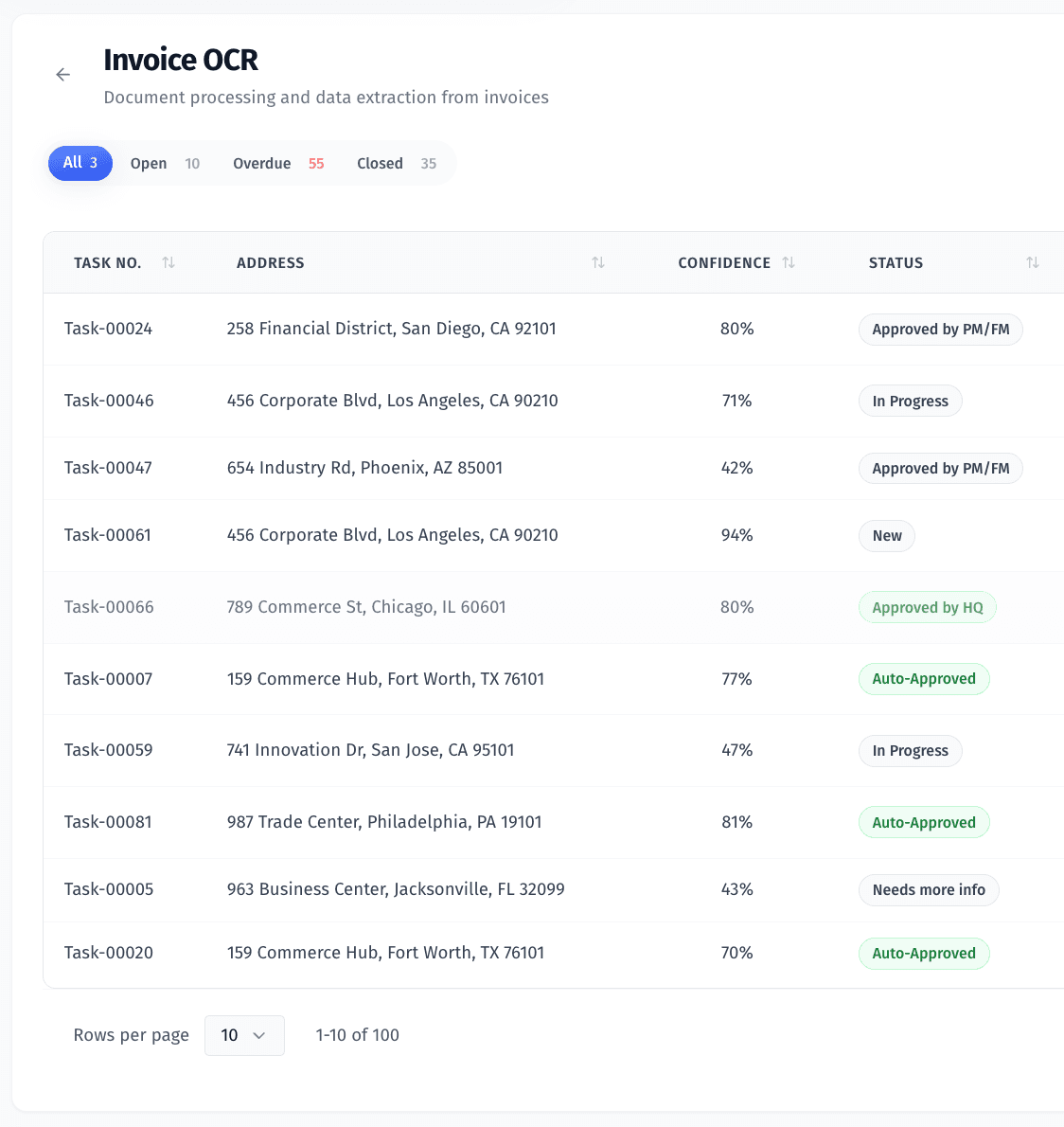
What You’re Looking At
The task table includes:
Process-specific columns — such as Confidence, Status, Address, Assignee
Filters — search bar, “Assigned to Me” toggle, and dropdown filters
Status badges — like "Approved", "Needs more info", or "Rejected"
Aging indicators — shows how long a task has been open (e.g., “30d”)
Assignment column — so you can see who’s working on what (or assign)
What You Can Do Here
Click into a task to view or complete it
Assign or reassign tasks using the assignee dropdown
Sort by any column (e.g. Age, Confidence)
Use filters to focus on overdue, open, or assigned-to-you tasks
View task health at a glance with status and aging labels
Why It Matters
This view adapts based on the workflow selected, but always keeps:
A unified experience — no matter if it’s an invoice, ID check, or contact review
Scalable task handling — supports high volumes without switching tools
Flexible filtering and sorting — so you can work your way, whether that means triaging oldest tasks or reviewing the highest-confidence entries first
Even as workflows vary, this table stays your control center — helping your team stay fast, organized, and on top of what matters most.
Was this helpful?